
Natural Language Analytics on Google Cloud: The Infrastructure Around the Model
When it comes to Natural Language to SQL the question I wanted to answer was what the surrounding infrastructure should look like: how the service authenticates without a credential file, what stops a generated query from scanning more data than it should, and how you observe what is actually happening at runtime.
I built this solution as a personal proof of concept in my own GCP environment. Gemini handles one step, translating a question into SQL. The rest is provisioning the service, wiring up identity without credential files, constraining what BigQuery will execute and getting useful logs out of Cloud Run. The service uses Cloud Run, Agent Platform (formerly Vertex AI) and the public BigQuery thelook_ecommerce dataset.12
Architecture Decisions
- Cloud Run and BigQuery, not GKE or Cloud SQL: for a stateless analytical workload, Cloud Run made more sense than GKE — no cluster to manage, no idle cost, and I get managed TLS and service identity for free. BigQuery supplies dry-run estimates and a per-query
maximum_bytes_billedlimit.3 - FastAPI and
gemini-3.5-flash: FastAPI handles request validation and application lifecycle cleanly. In my view, a Flash model is the right starting point for a bounded text-to-SQL transformation, fast enough for interactive use whilst remaining cost effective for iteration. Model choice should ultimately be validated against a representative evaluation set, not taken on trust from a reference design.4
Architecture and Request Flow
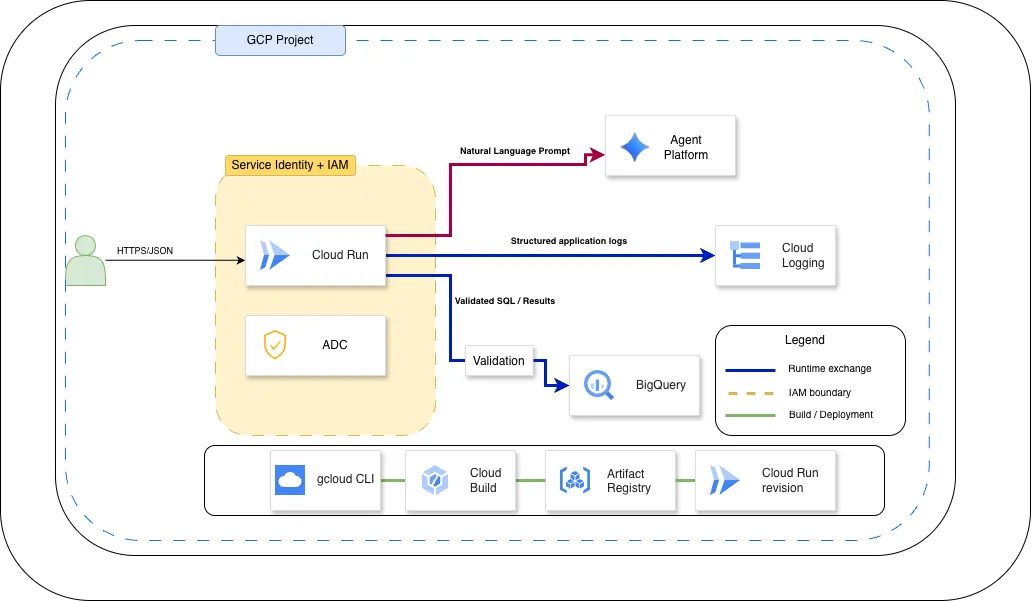 Figure 1: Each labelled line represents an architectural relationship rather than an individual request or response. Runtime permissions are attached to the Cloud Run service identity inside the amber IAM boundary.
I exposed a single endpoint. Cloud Run sends the question and known schema to Gemini, validates the returned GoogleSQL, runs a BigQuery dry run and executes only queries below the byte limit. Results return as JSON.
Model output is untrusted input, not an instruction that bypasses controls.
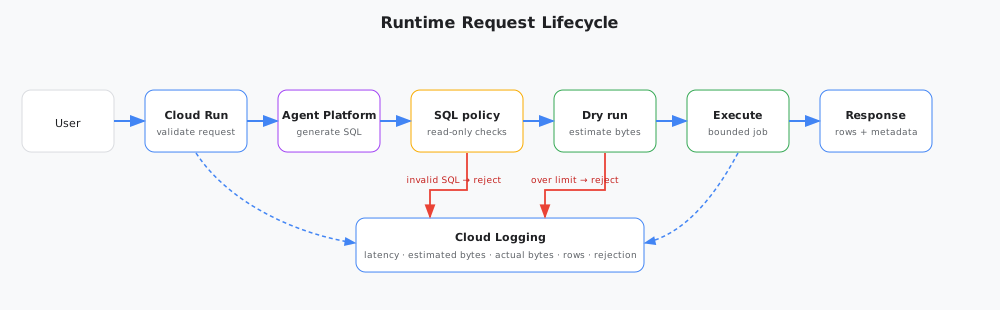 Figure 2: Runtime controls are applied between model generation and query execution.
Provisioning the Infrastructure
First things first you need to enable the APIs. The commands below assume you have permission to create repositories, submit builds, deploy Cloud Run services and attach a runtime service account. Attaching that account requires iam.serviceAccounts.actAs, normally granted through roles/iam.serviceAccountUser.5
# Enable required APIs
gcloud services enable \
  artifactregistry.googleapis.com \
  bigquery.googleapis.com \
  cloudbuild.googleapis.com \
  run.googleapis.com \
  aiplatform.googleapis.com
# Create the service account and grant runtime permissions
gcloud iam service-accounts create nl-analytics-api \
--display-name="NL Analytics API"
gcloud projects add-iam-policy-binding PROJECT_ID \
--member="serviceAccount:nl-analytics-api@PROJECT_ID.iam.gserviceaccount.com" \
--role="roles/bigquery.jobUser"
gcloud projects add-iam-policy-binding PROJECT_ID \
--member="serviceAccount:nl-analytics-api@PROJECT_ID.iam.gserviceaccount.com" \
--role="roles/aiplatform.user"roles/bigquery.jobUser lets the service account submit queries. roles/aiplatform.user is the standard role for Agent Platform access. There is no narrower predefined role for Gemini specifically. The underlying API identifier (aiplatform.googleapis.com) and IAM role reflect the Vertex AI layer that Agent Platform builds on. In production, VPC Service Controls provide the network-level boundary. The thelook_ecommerce dataset is public, so no dataset-level IAM is needed here; a private dataset would also require roles/bigquery.dataViewer scoped to that specific dataset.
Once the IAM bindings are in place, create the Artifact Registry repository and build the image:
gcloud artifacts repositories create nl-analytics \
  --repository-format=docker \
  --location=europe-west2

gcloud builds submit \
  --tag europe-west2-docker.pkg.dev/PROJECT_ID/nl-analytics/api:v1
Cloud Build pushes the tagged image to Artifact Registry. Then deploy to Cloud Run:
gcloud run deploy nl-analytics-api \
  --image=europe-west2-docker.pkg.dev/PROJECT_ID/nl-analytics/api:v1 \
  --service-account=nl-analytics-api@PROJECT_ID.iam.gserviceaccount.com \
  --region=europe-west2 \
  --set-env-vars=GOOGLE_CLOUD_PROJECT=PROJECT_ID,VERTEX_LOCATION=europe-west2 \
  --min-instances=0 \
  --max-instances=1 \
  --no-allow-unauthenticated
Cloud Run successfully deployed as per below:
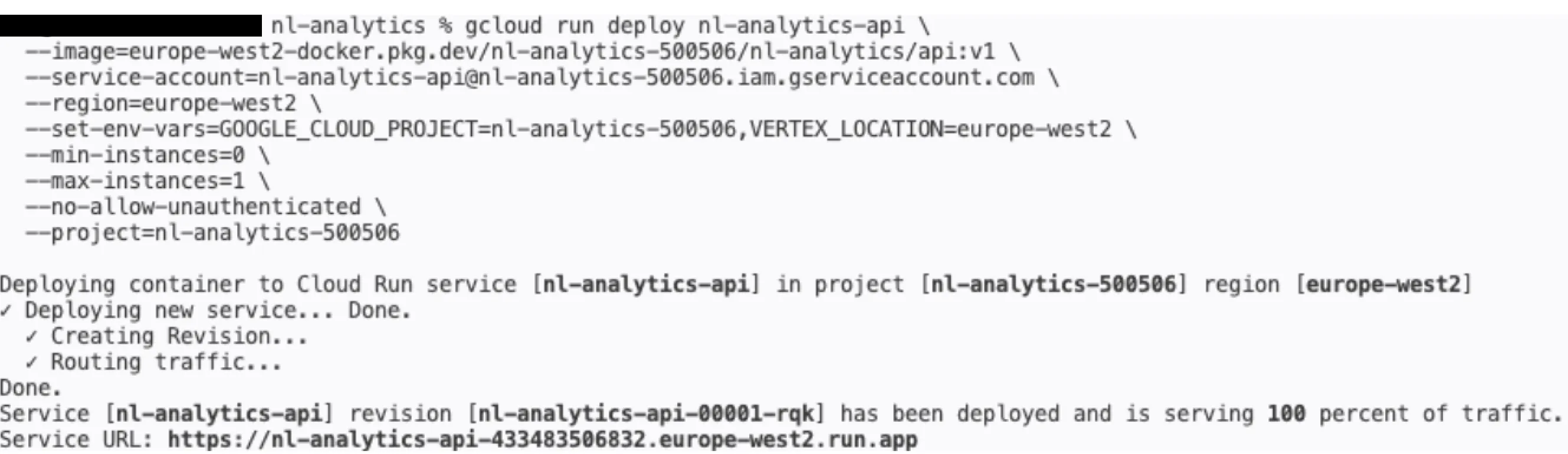 Figure 3: Cloud Run confirms the revision is live and serving 100% of traffic.
In this command sequence Cloud Build builds and pushes the image; the identity running gcloud run deploy performs the deployment. If deployment is moved into a Cloud Build pipeline, that pipeline’s service account becomes the deployer and needs the corresponding Cloud Run, Artifact Registry and iam.serviceAccounts.actAs permissions.
Identity Without Credential Files
It is worth just clarifying how Identity is working here. Cloud Run runs as nl-analytics-api@PROJECT_ID.iam.gserviceaccount.com. That service account is the workload’s identity. There is no key to load, no credential path to configure.
The client initialisation is exactly what it looks like:
from google.cloud import bigquery

bq_client = bigquery.Client()
ADC obtains short-lived credentials for the Cloud Run service identity automatically. Locally, the same code works with gcloud auth application-default login. Although often described broadly as Workload Identity, Cloud Run documentation calls this service identity.
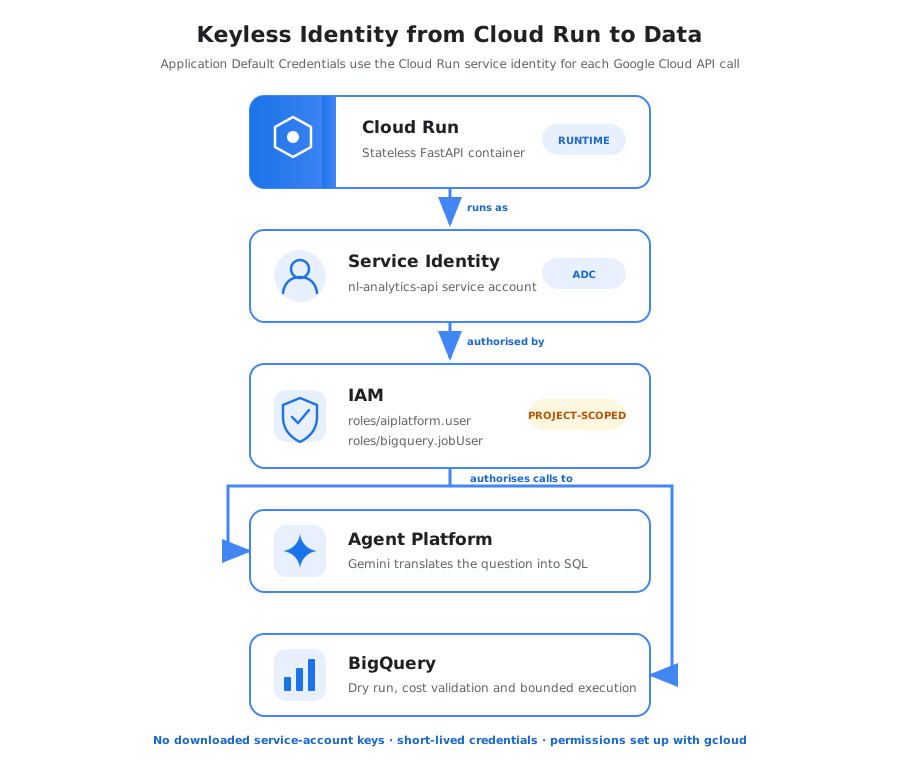 Figure 4: Runtime access is attached to the service account, not a credential file.
The same identity calls Gemini via Agent Platform and creates BigQuery jobs. IAM determines whether each operation is allowed; Google manages credential issuance and rotation.
Translating Natural Language into SQL
I designed the system instruction to supply the SQL dialect, schema, table relationships and constraints upfront. I exposed only a handful of thelook_ecommerce tables and required fully qualified names, GoogleSQL, a single read-only statement and a row limit. I then initialised the Gemini and BigQuery clients through FastAPI’s lifespan hook rather than on every request.6
You translate questions into GoogleSQL for BigQuery.

Available data:
- orders(order_id, user_id, status, created_at, num_of_item)
- order_items(order_id, product_id, status, sale_price, created_at)
- products(id, category, name, brand, retail_price)

Rules:
- Use only bigquery-public-data.thelook_ecommerce.
- Generate one SELECT statement.
- Never use DDL or DML.
- Use fully qualified table names.
- Add LIMIT 100 to non-aggregate result sets.
- Return SQL only, without Markdown.
The application strips Markdown code fences if they are present. That is output cleaning, not a security boundary; policy validation and the dry run still decide whether SQL executes.
I used a simple string check here to look for a single read-only statement. That is sufficient to illustrate the request path, but it is not a production SQL policy. A real service should parse an abstract syntax tree and enforce statement, table and function allowlists structurally.
In Practice
I ran the service against the public thelook_ecommerce dataset and captured the real outputs.7
The primary example asks for revenue by category across completed orders — no prompt engineering beyond the system instruction above:
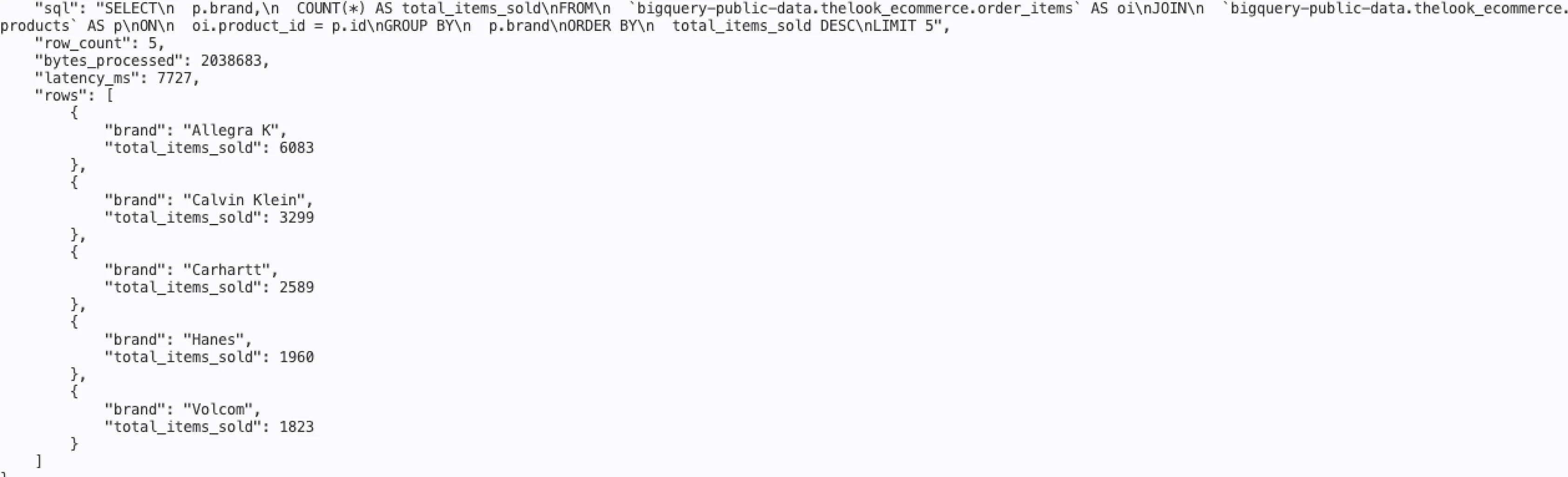 Figure 5: The service returned generated SQL, bytes scanned (5.4 MB), end-to-end latency (6.3 s) and five rows of results.
The model produced a clean JOIN with a WHERE filter and the correct aggregation:
SELECT
  p.category,
  SUM(oi.sale_price) AS total_revenue
FROM `bigquery-public-data.thelook_ecommerce.order_items` AS oi
JOIN `bigquery-public-data.thelook_ecommerce.products` AS p
  ON oi.product_id = p.id
WHERE oi.status = 'Complete'
GROUP BY p.category
ORDER BY total_revenue DESC
LIMIT 5
The 6.3 second latency covers the full round trip: HTTP request handling, Agent Platform inference, BigQuery dry run and query execution. For a reference design on scale-to-zero infrastructure it is within a reasonable range.
A second query — average sale price by category — returned 26 rows across a different aggregation:
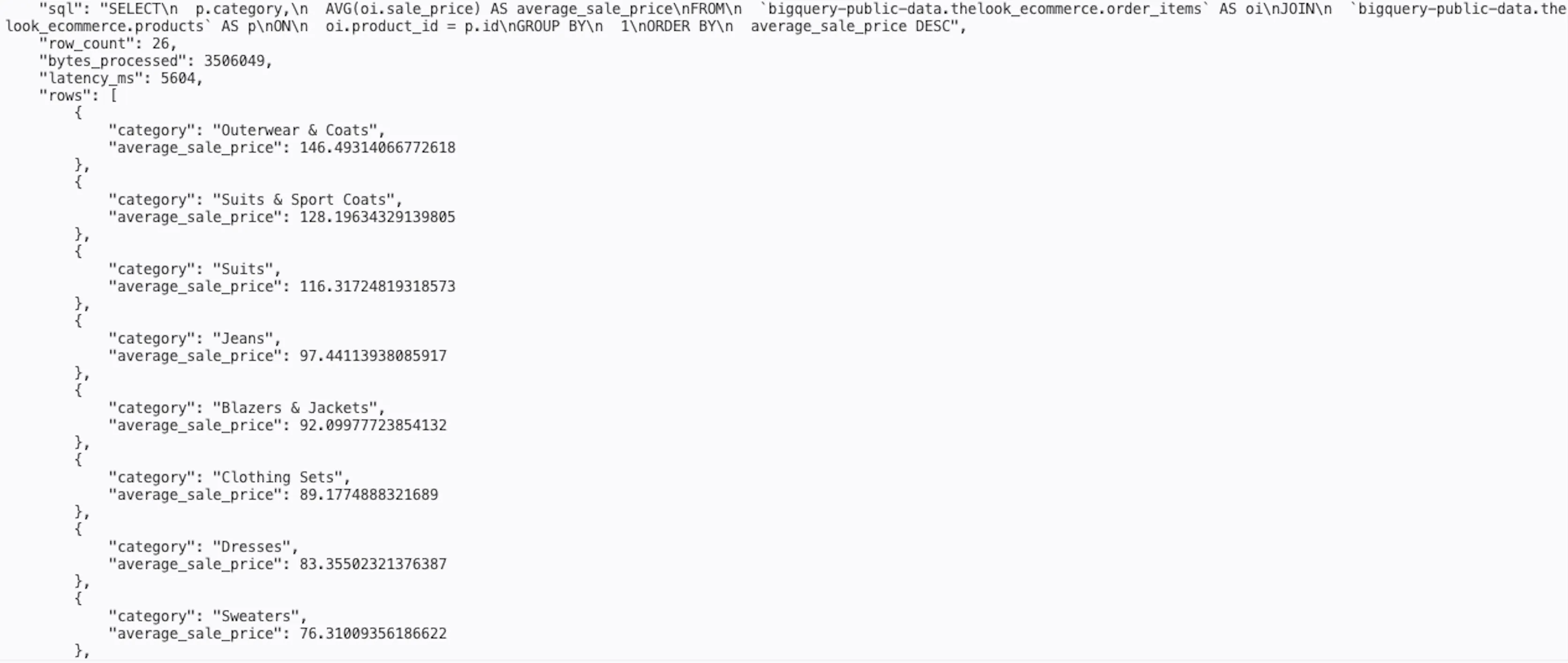 Figure 6: Average sale price by category — 3.5 MB scanned, 5.7 s end-to-end, 26 rows returned.
Top brands by items sold confirmed the same pattern: 2.0 MB, 5 rows, 7.7 s.
Byte counts across all three queries stayed well inside the 100 MB guardrail. The dual-control approach — dry run estimate followed by maximum_bytes_billed enforcement — means neither check alone is the safety net.
Running BigQuery Safely
I treat generated SQL as untrusted input — it never moves directly from model output to execution. A BigQuery dry run validates it and returns an estimate of bytes processed without executing the query.3
MAX_BYTES_PROCESSED = 100_000_000  # 100 MB

def run_guarded_query(sql: str, client: bigquery.Client):
    dry_config = bigquery.QueryJobConfig(
        dry_run=True,
        use_query_cache=False,
    )
    dry_job = client.query(sql, job_config=dry_config)
    estimated_bytes = dry_job.total_bytes_processed or 0

    if estimated_bytes > MAX_BYTES_PROCESSED:
        raise HTTPException(
            status_code=422,
            detail="Generated query exceeds the processing limit",
        )

    execute_config = bigquery.QueryJobConfig(
        maximum_bytes_billed=MAX_BYTES_PROCESSED,
        use_legacy_sql=False,
    )
    job = client.query(sql, job_config=execute_config)
    rows = [dict(row.items()) for row in job.result(max_results=100)]
    return rows, job.total_bytes_processed or estimated_bytes
The application rejects estimates above the threshold. maximum_bytes_billed enforces the same ceiling during execution, protecting against changes between validation and execution.
This is a cost guardrail, not a complete security model. Restricted data access and structural SQL validation are still required. A row limit controls response size, not bytes scanned. The public dataset is readable by authenticated principals, but a private deployment should grant the runtime identity access only to the specific views or datasets it needs.
Observability from Standard Output
Cloud Run forwards stdout to Cloud Logging automatically. Writing one JSON object per line means Cloud Logging can parse each field individually, making latency, byte counts and row counts filterable in Log Explorer without any custom metric configuration.8
def log_query(bytes_processed: int, row_count: int, latency_ms: int) -> None:
    print(json.dumps({
        "severity": "INFO",
        "message": "Natural language query completed",
        "bytes_processed": bytes_processed,
        "row_count": row_count,
        "latency_ms": latency_ms,
    }))
Application logs should record latency, bytes and row count for successful requests, and the reason and estimate for rejected requests. Questions, generated SQL and results are deliberately excluded because they may contain sensitive context.
Design Takeaways
Deployment identity and runtime identity are different. The deployer needs permission to attach the runtime service account. The runtime service account needs only the API permissions used by the application. Keeping those concerns separate makes IAM failures easier to reason about and avoids giving deployment permissions to the running container.
Dry runs and execution limits solve different problems. The dry run provides an estimate that the application can report or reject. maximum_bytes_billed gives BigQuery an execution-time ceiling. Using both is more useful than relying on either alone.
Prompt changes need tests. Supplying accurate schema context and explicit constraints should improve the chance of valid SQL, but that is still a hypothesis until it is measured against representative questions. A useful evaluation set should include ambiguous metrics, joins, date boundaries, unsupported questions and deliberately adversarial input.
Limitations and Next Steps
I kept the scope deliberately narrow for the purposes of this proof of concept:
- One dataset with a manually maintained schema
- Cloud Run IAM authentication, but no application-level user authorisation, tenancy controls or rate limiting
- No structural SQL parser — a string check, not an AST
- No representative question set or model comparison
The gap between this and a service for real enterprise data includes semantic definitions, application-level authorisation, structural SQL validation, evaluation, abuse controls and schema management. IAM is necessary, but it does not solve those application concerns.
Next, I’d add live schema discovery via INFORMATION_SCHEMA, result and translation caching, Cloud Monitoring metrics, a prompt-evaluation set for regression testing, and tighter data access via authorised views or column-level security.
Conclusion
In this design, I gave Gemini one bounded step: translating a question into candidate SQL. Cloud Run service identity removes downloaded keys, and I used the dry run and maximum_bytes_billed together to constrain query cost. Those controls make a useful proof of concept, but they do not by themselves make generated SQL safe for production data. Structural validation, narrow data access and a representative evaluation set are the next threshold.
References
Footnotes
-
Google Cloud. Introduction to service identity. https://cloud.google.com/run/docs/securing/service-identity ↩
-
Google Cloud. How Application Default Credentials works. https://cloud.google.com/docs/authentication/application-default-credentials ↩
-
Google Cloud. Estimate and control costs in BigQuery. https://cloud.google.com/bigquery/docs/best-practices-costs ↩ ↩2
-
Google Cloud. Gemini models on Agent Platform. https://cloud.google.com/vertex-ai/generative-ai/docs/models ↩
-
Google Cloud. Configure service identity for services. https://cloud.google.com/run/docs/configuring/services/service-identity ↩
-
Google Cloud. Google Gen AI SDK for Agent Platform. https://cloud.google.com/vertex-ai/generative-ai/docs/sdks/overview ↩
-
Google Cloud. BigQuery public datasets. https://cloud.google.com/bigquery/public-data ↩
-
Google Cloud. Write structured logs. https://cloud.google.com/logging/docs/structured-logging ↩