VPC Network Peering, Private Services Access (PSA), and Private Service Connect (PSC) all come up when discussing private connectivity on Google Cloud. The question I wanted to answer was what each one actually makes reachable: another VPC’s resources, a managed service, or a particular service endpoint.
PSA was the part I had to think through most carefully. It uses VPC Network Peering underneath, but with Cloud SQL the other side is a network managed by Google. I initially put the private connection on the wrong VPC and had to work back through which network was consuming Cloud SQL.
So I built a lab in my own environment and looked at three things:
- Overlapping CIDR blocks
- Reachability through an intermediate VPC
- Private DNS visibility and endpoint naming from the consumer side
How the Connections Work
-
VPC Network Peering exchanges routes between two VPC networks. It is not transitive: peering A with B and B with C doesn’t connect A to C. Overlapping private IPv4 subnet ranges prevent peering from becoming active. Once the networks are peered, an operation that would introduce a conflicting subnet range is rejected.1
-
Private Services Access connects your VPC to a supported service producer through Service Networking. For Cloud SQL, I reserve an IP range in my VPC, and Google uses addresses from that allocation for service subnets in its managed VPC. The connection uses peering and inherits its routing constraints.23
-
Private Service Connect has several connection types. Here I used endpoints for a published service: the producer exposes an internal load balancer through a service attachment, and each consumer creates an endpoint with an IP address in its own subnet. The two networks don’t exchange routes and can use overlapping subnet ranges.45 PSC translates incoming source addresses using the producer’s PSC NAT subnet. With an internal passthrough Network Load Balancer, as configured here, the backend receives traffic with that translated source address.6
Of the three, PSA is the one I would treat most carefully from a routing perspective, because the underlying peering is easy to overlook. The console hides the peering handshake underneath it, so it’s easy to treat it like general purpose private connectivity. It isn’t. The routing constraints of Peering still apply across that boundary, they’re just not visible from the setup.
The names in the lab need a little care. producer-vpc hosts my HTTP service for Peering and PSC, but it is the consumer of Cloud SQL over PSA. Google is the producer in that relationship. I’ve kept the resource names throughout so they match the commands and screenshots.
Before the lab, here’s how I’d summarise the decision on paper:
| Requirement | VPC Peering | PSA | PSC |
|---|---|---|---|
| Connect two VPCs | Yes | No | No |
| Access Google-managed service | No | Yes | Sometimes, where supported |
| Publish one application/service | No | No | Yes |
| Requires non-overlapping ranges | Yes | Allocation has routing considerations | No for published-service endpoints |
| Transitive | No | No | Endpoint isn’t a transit gateway |
| Consumer gets routes to producer | Yes | Service-specific/private-service connectivity | No |
| Good cross-team service boundary | Sometimes | Managed-service-specific | Yes |
My Lab Setup
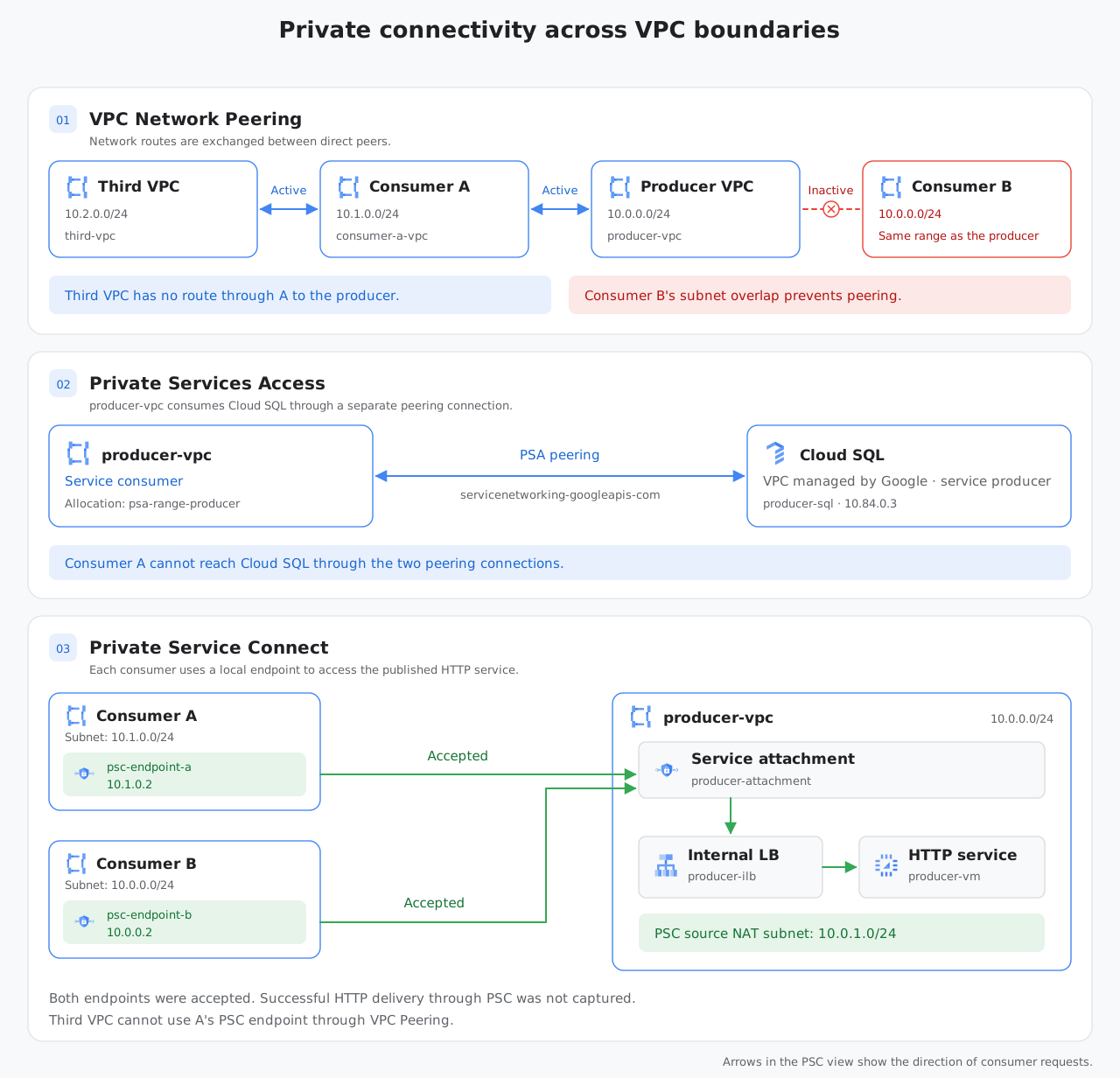
Figure 1: The same lab shown in three views. Each view follows one connection type and the boundary it crosses.
- Producer VPC: hosts a small HTTP service, with the VM’s address as the target for the Peering test and an internal load balancer for PSC. It also has the PSA connection to Cloud SQL in Google’s managed VPC.
- Consumer VPC A: uses a subnet range that doesn’t overlap with the producer’s.
- Consumer VPC B: deliberately uses the same subnet range as the producer.
- Third VPC: peers only with A, providing the extra hop for the transitivity tests.
The commands below are excerpts from the build. They cover the network connections and checks, with VM creation, HTTP load balancer setup, firewall rules and API enablement omitted. Replace PROJECT_ID and PRODUCER_VM_INTERNAL_IP with your own values; addresses such as 10.84.0.3 are specific to this run.
gcloud compute networks create producer-vpc --subnet-mode=custom
gcloud compute networks subnets create producer-subnet \
  --network=producer-vpc --region=europe-west2 --range=10.0.0.0/24

gcloud compute networks create consumer-a-vpc --subnet-mode=custom
gcloud compute networks subnets create consumer-a-subnet \
  --network=consumer-a-vpc --region=europe-west2 --range=10.1.0.0/24

# Deliberately overlaps the producer's 10.0.0.0/24
gcloud compute networks create consumer-b-vpc --subnet-mode=custom
gcloud compute networks subnets create consumer-b-subnet \
  --network=consumer-b-vpc --region=europe-west2 --range=10.0.0.0/24

gcloud compute networks create third-vpc --subnet-mode=custom
gcloud compute networks subnets create third-subnet \
  --network=third-vpc --region=europe-west2 --range=10.2.0.0/24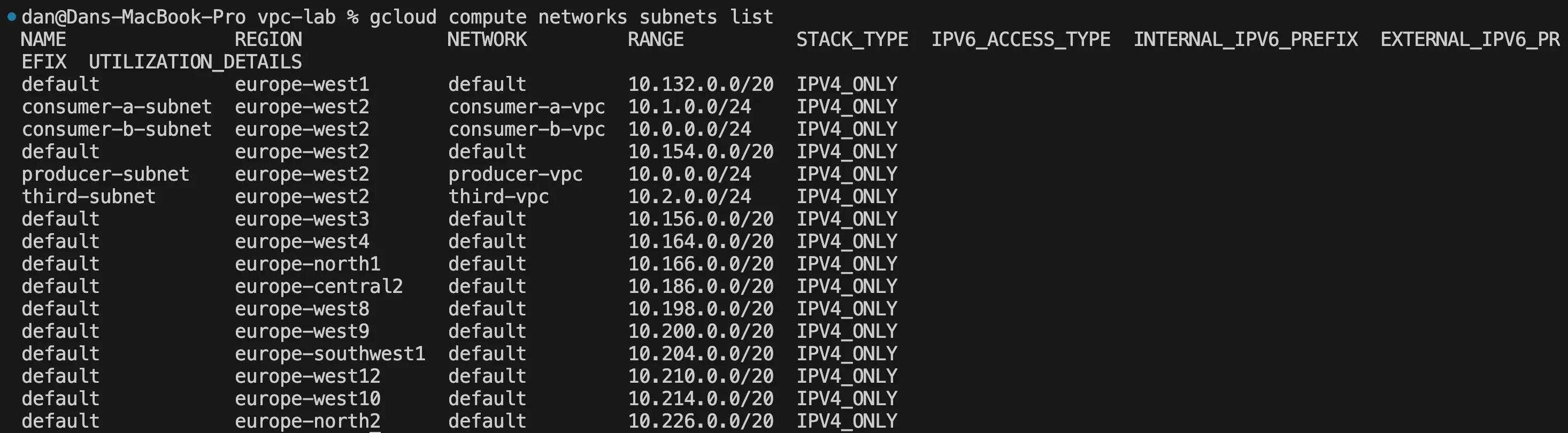
consumer-b-subnet and producer-subnet both use 10.0.0.0/24. Consumer A and the third VPC use separate ranges.
Results: Overlapping CIDR Ranges
So I started with the matching subnet ranges in the producer and Consumer B. I did expect the Peering to reject the overlap and PSC to accept it. The PSA setup needed a correction before I could interpret its result.
Peering
The examples below omit the deprecated --auto-create-routes flag; private IPv4 subnet routes are exchanged automatically.7
gcloud compute networks peerings create producer-to-a \
  --network=producer-vpc --peer-network=consumer-a-vpc
gcloud compute networks peerings create a-to-producer \
  --network=consumer-a-vpc --peer-network=producer-vpc

gcloud compute networks peerings create producer-to-b \
  --network=producer-vpc --peer-network=consumer-b-vpc
gcloud compute networks peerings create b-to-producer \
  --network=consumer-b-vpc --peer-network=producer-vpc

gcloud compute networks peerings list --network=producer-vpc
gcloud compute routes list --filter="network=consumer-b-vpc"
producer-to-a is ACTIVE. producer-to-b is INACTIVE: “Peer network tried to connect and failed.” Consumer B’s route list still contains its default internet route and its local 10.0.0.0/24 subnet route. The matching ranges prevent the peering from becoming active.1
Private Services Access
I did run into a bit of a challenge here and had to correct. I first configured PSA on consumer-b-vpc, while the Cloud SQL creation command referenced producer-vpc. Creation did then fail with NETWORK_NOT_PEERED. The private connection needs to exist on the VPC selected for the instance, which in this build was producer-vpc.
gcloud compute addresses create psa-range-producer \
  --global --purpose=VPC_PEERING --prefix-length=16 \
  --network=producer-vpc

gcloud services vpc-peerings connect \
  --service=servicenetworking.googleapis.com \
  --ranges=psa-range-producer --network=producer-vpc

gcloud sql instances create producer-sql \
  --database-version=MYSQL_8_0 --tier=db-f1-micro --region=europe-west2 \
  --network=projects/PROJECT_ID/global/networks/producer-vpc \
  --no-assign-ip

gcloud services vpc-peerings list --network=producer-vpc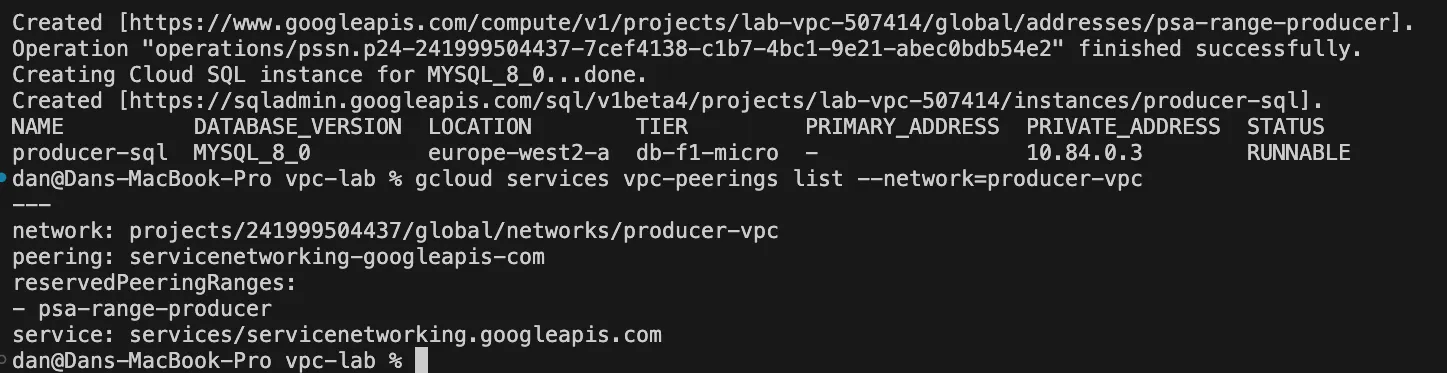
Cloud SQL was created at 10.84.0.3, and vpc-peerings list shows the servicenetworking-googleapis-com connection using psa-range-producer.
This will then establish the PSA connection, but doesn’t test overlap across it. Consumer B’s conflicting subnet prevents its own peering with producer-vpc. Even if I did fix that overlap, ordinary peering through producer-vpc would still not give B access to Cloud SQL which would require crossing a second peering connection.3
In my experience, keep the PSA allocation separate from current and future subnet ranges, including those in peered networks and VPC spokes on the same Network Connectivity Center (NCC) hub.2. For the purposes of this lab I didn’t deliberately overlap the PSA allocation.
Private Service Connect
For PSC, both consumers should target the same service attachment through their own local endpoints. The producer also needs a dedicated subnet for PSC’s source NAT addresses.
gcloud compute networks subnets create psc-nat-subnet \
  --network=producer-vpc --region=europe-west2 --range=10.0.1.0/24 \
  --purpose=PRIVATE_SERVICE_CONNECT

gcloud compute service-attachments create producer-attachment \
  --region=europe-west2 --producer-forwarding-rule=producer-ilb \
  --connection-preference=ACCEPT_AUTOMATIC --nat-subnets=psc-nat-subnet

for CONSUMER in a b; do
  gcloud compute addresses create psc-endpoint-ip-${CONSUMER} \
    --region=europe-west2 --subnet=consumer-${CONSUMER}-subnet

  gcloud compute forwarding-rules create psc-endpoint-${CONSUMER} \
    --region=europe-west2 --network=consumer-${CONSUMER}-vpc \
    --subnet=consumer-${CONSUMER}-subnet \
    --address=psc-endpoint-ip-${CONSUMER} \
    --target-service-attachment=projects/PROJECT_ID/regions/europe-west2/serviceAttachments/producer-attachment
done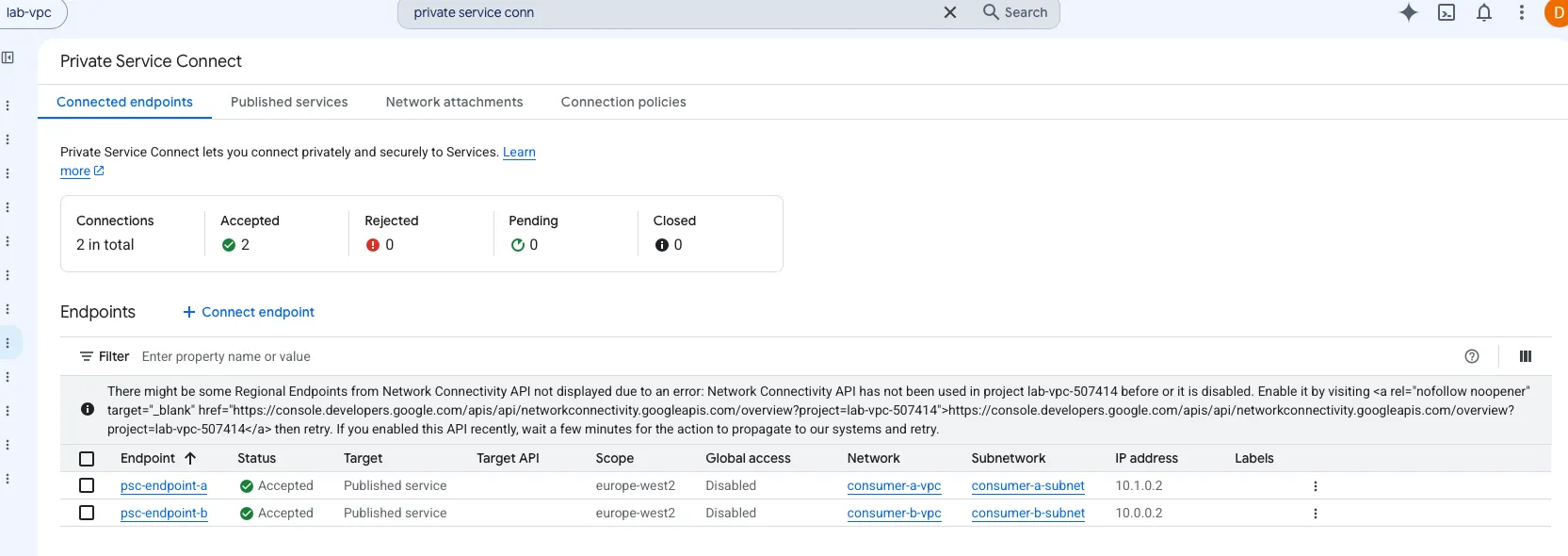
Both endpoints in this example show Accepted. psc-endpoint-b has address 10.0.0.2 in Consumer B’s subnet, which uses the same range as the producer’s subnet. The overlap didn’t prevent endpoint creation and acceptance. In this lab I did not capture a successful HTTP request through B’s endpoint.
Results: Transitivity
Next I added the peering between third-vpc and Consumer A. This gives a chain of active peerings towards the producer, but no direct connection. I expected the producer VM and Cloud SQL to be unreachable through that chain. For PSC, the question was whether the third VPC could use A’s endpoint.
Peering
gcloud compute networks peerings create third-to-a \
  --network=third-vpc --peer-network=consumer-a-vpc
gcloud compute networks peerings create a-to-third \
  --network=consumer-a-vpc --peer-network=third-vpc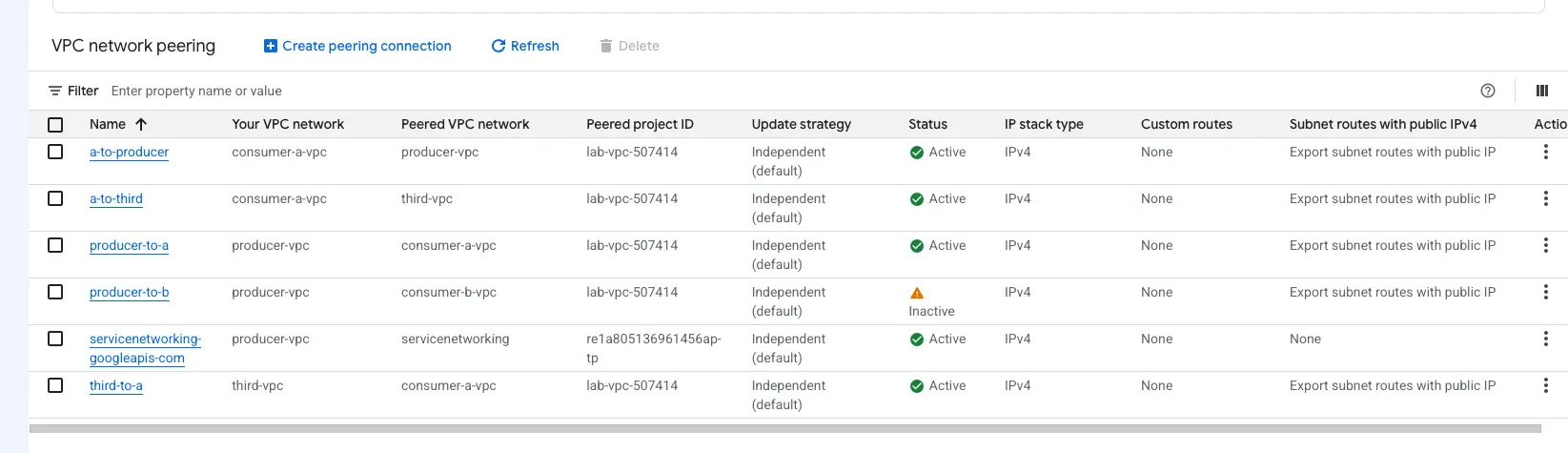
The console shows active peerings between A and the third VPC, and between A and the producer.
gcloud compute ssh test-vm-third --zone=europe-west2-a --tunnel-through-iap \
  --command="curl -s --max-time 5 http://PRODUCER_VM_INTERNAL_IP"
The request timed out. That fits the documented topology: A doesn’t pass routes learned from the producer on to the third VPC.1 A timeout alone wouldn’t identify the cause; a blocked firewall rule or an unavailable HTTP service could produce the same symptom.
Private Services Access
gcloud network-management connectivity-tests create third-to-sql-test \
  --source-instance=projects/PROJECT_ID/zones/europe-west2-a/instances/test-vm-third \
  --destination-ip-address=10.84.0.3 --destination-port=3306 \
  --protocol=TCP

gcloud network-management connectivity-tests describe third-to-sql-test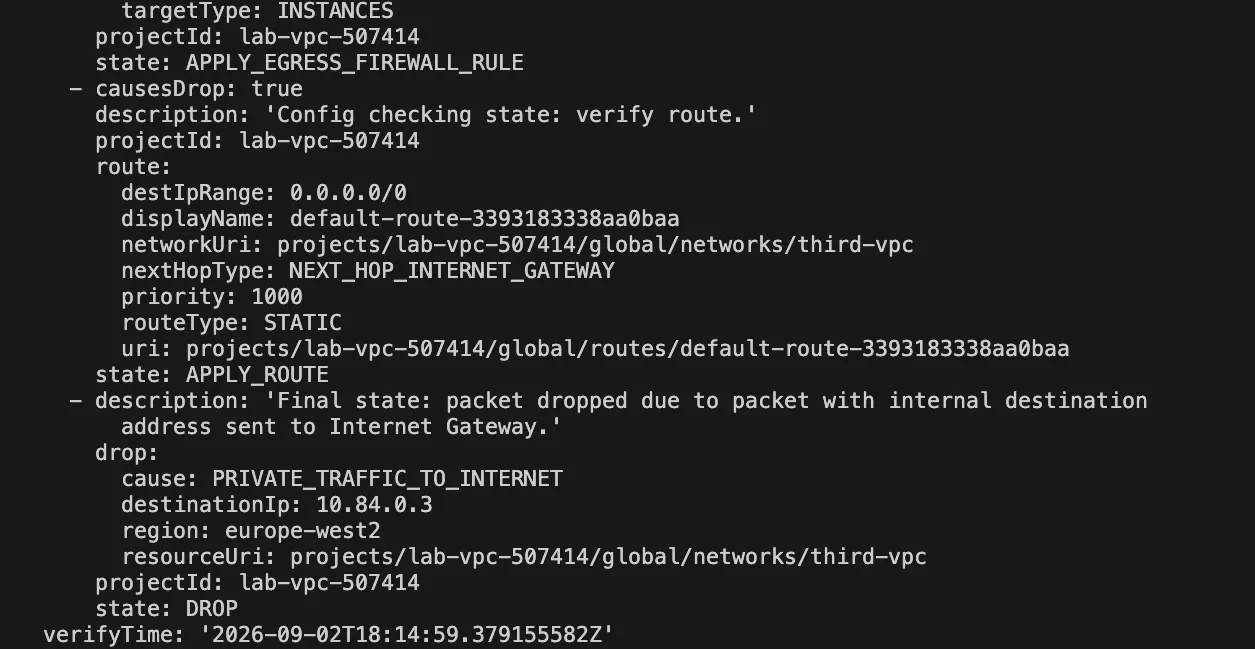
Connectivity Tests reported UNREACHABLE. Its configuration trace selects the default internet route for 10.84.0.3 and ends with PRIVATE_TRAFFIC_TO_INTERNET: there is no more specific route to Cloud SQL in the third VPC. This is a simulated packet path from configuration analysis.8
The extra PSA peering matters here. Even Consumer A, which peers directly with producer-vpc, cannot use that private connection through peering alone.3
Private Service Connect
gcloud compute ssh test-vm-third --zone=europe-west2-a --tunnel-through-iap \
  --command="curl -v --max-time 5 http://10.1.0.2; echo EXIT_CODE=\$?"
Here I used verbose output and printed the exit code so the failed connection was visible in the capture.
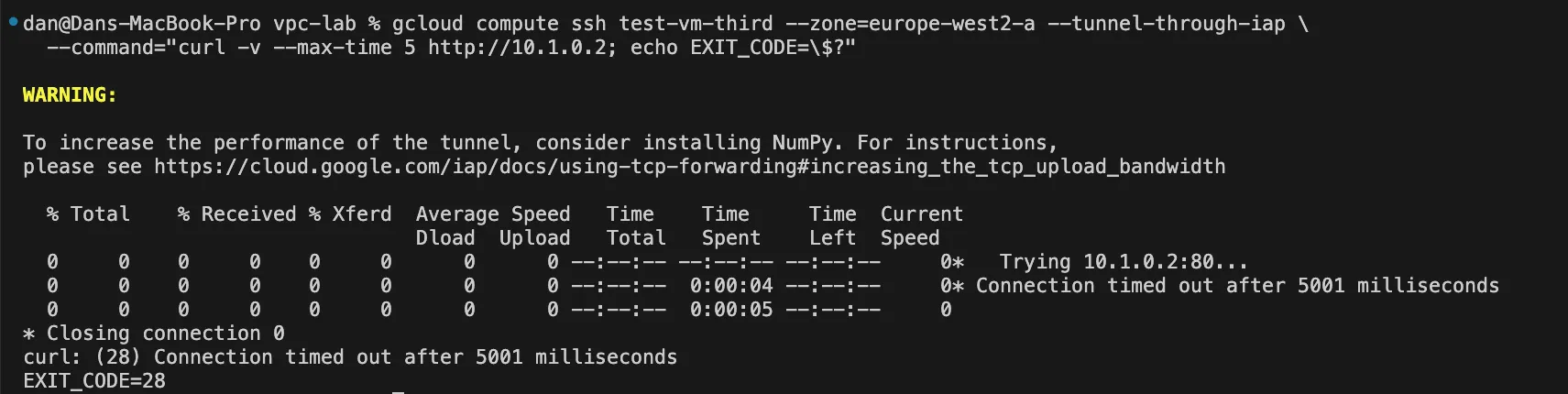
The connection timed out after five seconds with EXIT_CODE=28. Google documents that clients in peered VPC networks cannot access these endpoints.9 The third VPC can import A’s subnet route, but that doesn’t make A’s PSC endpoint usable from it. The timeout is consistent with that restriction, although it doesn’t isolate the cause on its own.
There are other supported access patterns in Google Cloud. For example, Network Connectivity Center (NCC) can propagate PSC connections to participating spokes when configured to do so.10 PSC interfaces also support transitive connectivity, but serve a different purpose: they let a producer initiate connections into a consumer network and reach destinations connected to it.11
DNS: Visibility Is Different From Connectivity
For DNS, I checked the visibility of a producer zone, looked for Cloud SQL naming information, and created a local record for a PSC endpoint. These are different configuration checks, so they don’t provide a direct comparison of automatic DNS.
Peering
gcloud dns managed-zones create producer-zone \
  --dns-name=producer.internal. --visibility=private \
  --networks=producer-vpc --description="Producer service DNS, for peering/PSA visibility tests"

gcloud dns record-sets create producer.internal. \
  --zone=producer-zone --type=A --ttl=300 --rrdatas=PRODUCER_VM_INTERNAL_IP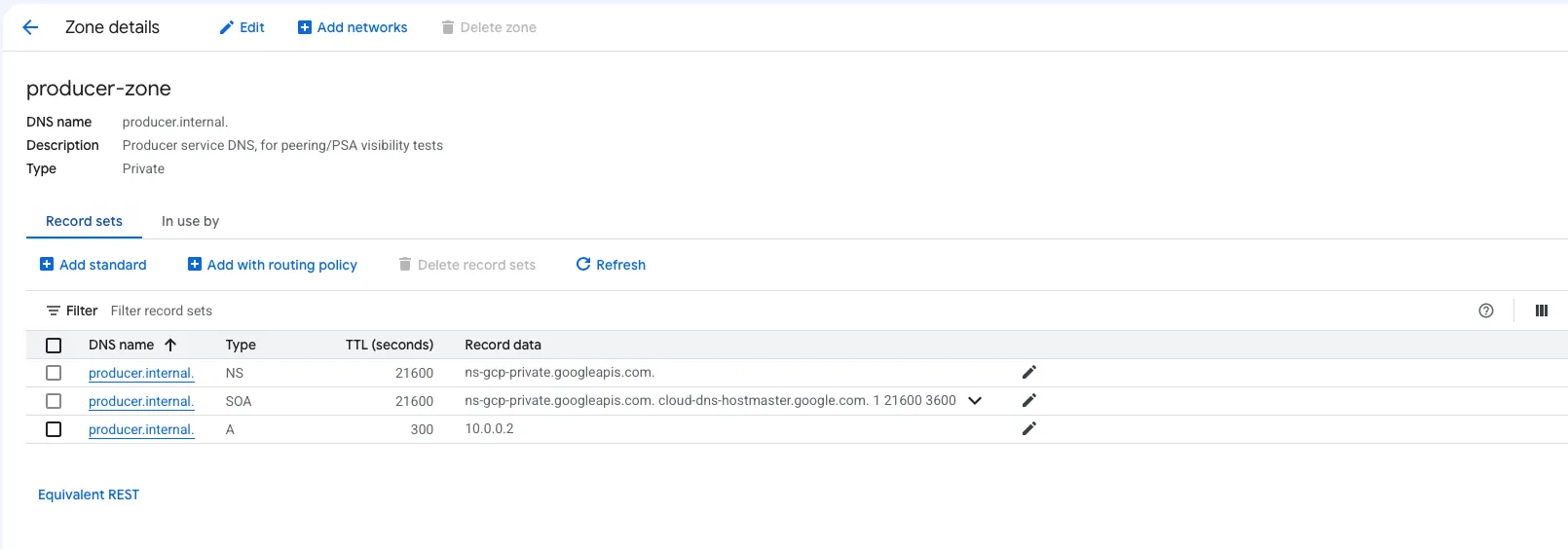
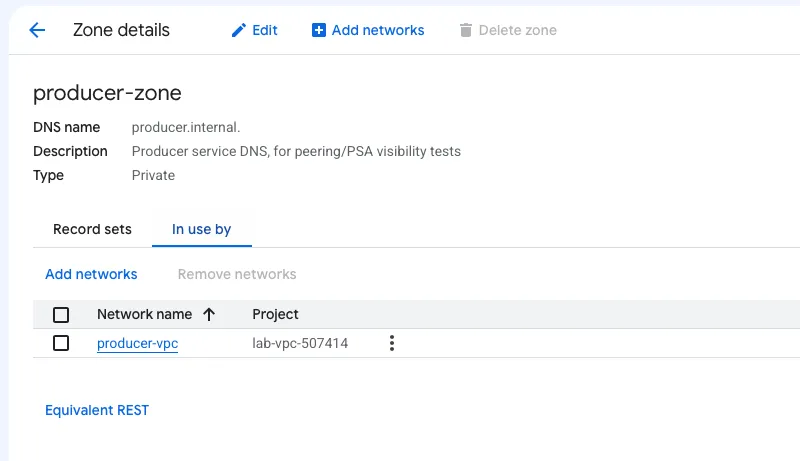
producer-zone contains the A record, but its “In use by” panel lists only producer-vpc. VPC Peering doesn’t automatically extend a private zone’s visibility to the peer.1
To make this name available to Consumer A, I could authorise A to use the same zone or create a Cloud DNS peering zone in A that queries the producer’s DNS namespace.12 Neither change is shown here; the screenshots establish the zone’s configuration, rather than a DNS lookup result from A.
Private Services Access
gcloud dns managed-zones list --filter="visibility=private AND peeringConfig:*"
gcloud sql instances describe producer-sql --format="get(dnsName)"
The filtered zone list returned no items, with a warning that peeringConfig wasn’t present in the returned resources. The instance’s dnsName field was also empty. I only checked that one field: the API exposes dnsNames[] and psaWriteEndpoint separately, so this doesn’t rule out every possible name.13
For a simple hostname, I could create a private A record pointing to the instance’s private IP. Cloud SQL also manages DNS for its PSA write endpoint feature, available to eligible MySQL instances using Enterprise Plus and the new network architecture, with the required APIs enabled.14 That feature wasn’t part of this db-f1-micro build.
Service Networking also has a DNS peering feature that lets a producer resolve names in the consumer’s network. Google lists Cloud SQL as not supporting that feature.23 This concerns queries in the opposite direction from a client looking up Cloud SQL, and is separate from the DNS configuration for write endpoints.
Private Service Connect
gcloud dns managed-zones create consumer-a-zone \
  --dns-name=internal. --visibility=private \
  --networks=consumer-a-vpc --description="Consumer A local zone for PSC endpoint resolution test"

gcloud dns record-sets create psc-a.internal. \
  --zone=consumer-a-zone --type=A --ttl=300 --rrdatas=10.1.0.2

gcloud compute ssh test-vm-consumer-a --zone=europe-west2-a --tunnel-through-iap \
  --command="dig +short psc-a.internal"
dig +short psc-a.internal returned 10.1.0.2, Consumer A’s local endpoint address. The manual record resolved from the VM in A as expected.
This service attachment had no DNS domain configured. PSC can create DNS entries automatically through Service Directory when the producer supplies a domain and the consumer endpoint meets the prerequisites.15 I used a manually managed private zone for this test.
Limitations
- A small lab in one region. Four VPCs I managed, plus Google’s PSA network, with regional resources in
europe-west2. I didn’t test scale, performance, PSC global access or behaviour during resource replacement. - Different service boundaries. Peering and PSC used my HTTP service; PSA used Cloud SQL. The PSA allocation itself wasn’t tested with overlapping ranges.
- Incomplete traffic validation. The captures don’t include successful baseline requests to the producer service or through the PSC endpoints. A stronger test would verify those first, including backend health and firewall access for clients, health checks and PSC NAT traffic, before comparing failures.
My Recommendation
For me, it comes down to how much connectivity the application needs, and which team will manage each network. Those are the key factors that influence a decision.
Use VPC Peering when resources in two VPCs need direct connectivity and the teams can coordinate their address ranges. I’d keep the topology simple enough to explain and check explicitly for any dependency on a second peering hop.
Use PSA for supported managed services that offer it, with the allocation and private connection on the intended consumer VPC. My Cloud SQL setup error was a useful reminder to draw the network managed by Google as a separate box. If other VPCs need access, plan a supported pattern such as Shared VPC, NCC producer VPC spokes where supported, or the service’s PSC option.3
PSC would be my starting point for publishing a specific service to another team, particularly when its network is managed independently. I’d decide where the clients live and how they’ll resolve the endpoint name before choosing where to place it. In this topology, an endpoint in Consumer A doesn’t also serve clients in the third VPC over their peering connection. That matters if the plan is to put all the endpoints in a shared services VPC.
PSC is my default when the architectural requirement is to publish a service rather than connect networks. It sidesteps address planning entirely, which is the constraint that actually causes outages. It is however fair to say that every situation is different. What I would say is check the access pattern before you make a decision.
Footnotes
-
Google Cloud. VPC Network Peering. ↩ ↩2 ↩3 ↩4
-
Google Cloud. Configure Private Services Access. ↩ ↩2 ↩3
-
Google Cloud. Private Service Connect overview. ↩
-
Google Cloud. Designing networks for migrating enterprise workloads: architectural approaches. ↩
-
Google Cloud. About published services (Private Service Connect): source NAT to the NAT subnet. ↩
-
Google Cloud. gcloud compute networks peerings create. ↩
-
Google Cloud. Connectivity Tests overview. ↩
-
Google Cloud. Access published services through endpoints. ↩
-
Google Cloud. Private Service Connect connection propagation through Network Connectivity Center. ↩
-
Google Cloud. About Private Service Connect interfaces. ↩
-
Google Cloud. Create a peering zone (Cloud DNS). ↩
-
Google Cloud. Cloud SQL Admin API: instances resource. ↩
-
Google Cloud. Connect to an instance using a write endpoint (Cloud SQL for MySQL). ↩
-
Google Cloud. DNS configuration for published services (Private Service Connect). ↩